The Complete Guide to Making International Phone Calls in 2026
Every method for making international phone calls in 2026 compared — carrier roaming, VoIP, browser calling, Google Voice. Real rates and honest trade-offs.
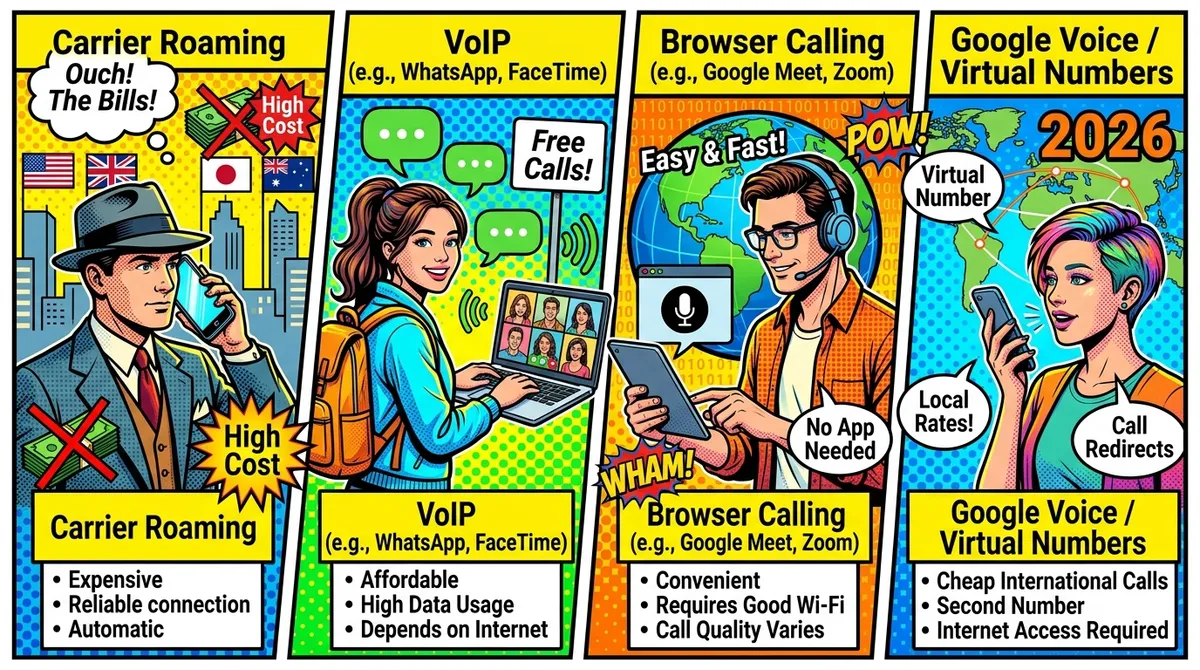
Your bank just froze your debit card. You’re in a cafe in Lisbon, it’s 6 PM local time, and your bank’s fraud department needs you to call a US phone number to verify your identity. No app-to-app option. No chat support. Just a 1-800 number and a hold time that could stretch to 45 minutes.
How much is that call going to cost you?
The answer depends entirely on which method you use. And in 2026, you have more options than ever for making international phone calls — from free solutions to methods that will drain your wallet faster than the espresso you just ordered.
This guide breaks down every way to make international calls, with real prices, honest trade-offs, and a clear picture of what works best depending on your situation.
The International Calling Landscape in 2026
The way people make international calls has shifted dramatically. Skype’s consumer calling service shut down in 2024. Traditional carriers still charge outrageous roaming fees. And a wave of browser-based and VoIP options have filled the gap with wildly different price points.
Here’s the quick overview before we dig into each method:
| Method | Cost Range (30-min US call) | Needs Internet | Needs App | Works Abroad |
|---|---|---|---|---|
| Carrier roaming | $7.50 - $90.00 | No | No | Yes |
| Calling cards | $3.00 - $8.00 | No | No | Yes |
| Google Voice | Free | Yes | No | Limited |
| WiFi calling | Free - carrier rate | Yes | No | Depends |
| VoIP apps (Viber, etc.) | $1.00 - $5.00 | Yes | Yes | Yes |
| Browser-based calling | $0.15 - $0.90 | Yes | No | Yes |
Let’s break each one down.
Carrier Roaming: The Expensive Default
If you do nothing and just dial an international number from your regular phone, you’re using carrier roaming. It’s the path of least resistance, and carriers price it accordingly.
What It Costs in 2026
| Carrier | Per-Minute Rate | Daily Pass Option |
|---|---|---|
| AT&T | $2.00 - $3.00/min | $10/day International Day Pass |
| Verizon | $2.99/min | $10/day TravelPass |
| T-Mobile (Magenta) | $0.25/min in 200+ countries | $15/mo add-on available |
| EE (UK) | ~$1.25 - $2.50/min | Varies by destination |
| Vodafone (UK) | ~$1.25 - $3.75/min | Varies by destination |
That 30-minute bank call on AT&T roaming? $60 to $90. On Verizon? About $90. T-Mobile is the outlier here — their Magenta plan includes international calling at $0.25/min in most countries, which makes that same call $7.50.
When Roaming Makes Sense
Honestly? Almost never for extended calls. But it works if you need to make a quick two-minute call and don’t have internet access. It also works as a backup when nothing else does — no WiFi, no data, just a cell signal.
When to Avoid It
Any call that involves hold time. Being on hold with your bank for 30 minutes at $2.99/min is a $90 mistake you only make once.
Calling Cards: Still Around, Still Confusing
Calling cards haven’t disappeared. You can still buy them at convenience stores, airports, and online. They work by routing your call through an access number.
The Real Cost
Advertised rates look cheap — sometimes as low as $0.01/min. But the actual cost is higher once you factor in connection fees, maintenance fees, and the minutes that “expire” after a set period.
A realistic cost for a 30-minute call to the US via calling card: $3 to $8, depending on the card and where you’re calling from.
Pros
- Works without internet
- Works from any phone, including hotel phones and payphones
- No account or app required
Cons
- Hidden fees are the norm, not the exception
- Audio quality varies wildly
- The access number dialing process is tedious
- Remaining balance often expires without notice
- Customer support is basically nonexistent
Calling cards are a last resort in 2026. If you have internet access, there are better options in every way.
Google Voice: Free but Limited
Google Voice is the go-to recommendation in every “how to call internationally” article. And for good reason — calls to US and Canadian numbers are free for US residents.
How It Works
You get a US phone number through Google. You can make and receive calls from the Google Voice web interface or mobile app. Calls to US/Canada numbers are free. International calls to other countries have per-minute rates.
The Catch
Google Voice is designed for people living in the US. If you’re abroad, things get complicated:
- You need a US phone number to sign up. No US number, no Google Voice.
- Call quality degrades from Asia and Africa. Lag, echo, and dropped calls are common when calling from Southeast Asia in particular.
- It doesn’t always work with VPNs. Google sometimes blocks calls from IP addresses outside the US.
- International rates (non-US destinations) aren’t free. Calling a UK mobile from Google Voice costs money.
Who It’s Good For
US residents who are temporarily traveling and mostly need to call US numbers. If you have a US Google Voice number already set up before you leave, it’s a solid free option for calling back home.
Who Should Look Elsewhere
Non-US residents, anyone calling non-US numbers frequently, and anyone who needs reliable quality from Asia or Africa.
WiFi Calling: Free When It Works
Most modern smartphones support WiFi calling. When enabled, your phone routes calls over a WiFi connection instead of the cellular network.
How It Works
You enable WiFi calling in your phone settings. Your phone connects to a WiFi network. You dial normally. The call routes over the internet but appears as a regular call on your carrier’s network.
The Cost Problem
Here’s where it gets confusing. WiFi calling uses your carrier’s rates, not internet calling rates. So if your plan includes free domestic calls, a WiFi call from Thailand to a US number might be free — or it might be billed as an international call at $2.99/min. It depends entirely on your carrier and plan.
- T-Mobile: WiFi calls from abroad generally count as if you’re in the US. Free if your plan includes domestic calls.
- AT&T: WiFi calling abroad is treated as roaming on many plans. Check your specific plan.
- Verizon: Similar to AT&T — WiFi calling abroad may incur international rates depending on your plan.
The Reliability Problem
WiFi calling requires a strong, stable WiFi connection. Hotel WiFi, airport WiFi, and cafe WiFi often don’t cut it. Calls drop, audio cuts out, and the experience is frustrating.
Bottom Line
WiFi calling is great when it works and your carrier treats it as a domestic call. But “when it works” is doing a lot of heavy lifting in that sentence. Don’t rely on it as your only option.
VoIP Apps: The App-Based Middle Ground
Apps like Viber Out, Skype (for user-to-user calls), WhatsApp, and others let you make international calls over the internet.
App-to-App Calls (Free)
If both people have the same app — WhatsApp, Viber, Telegram, FaceTime — the call is free. This works perfectly for casual calls with friends and family who are tech-savvy enough to have the app installed.
App-to-Phone Calls (Paid)
When you need to call a regular phone number — a bank, a government office, a doctor’s office, a business — you need a service that connects to the regular phone network (PSTN). This is where apps charge per-minute rates.
Viber Out is one of the more popular options:
- Requires the Viber app installed on your phone
- Credit-based, pay-as-you-go
- Rates vary widely by country
- Strong coverage in Eastern Europe
- Quality is generally acceptable
The App Problem
Every app-based solution requires you to download and install an app. That sounds minor, but consider these scenarios:
- You’re on a borrowed laptop and can’t install apps
- Your phone storage is full
- You’re using a hotel business center computer
- You need to call right now and don’t have time to set up an account
Apps also mean another account, another password, and another company holding your data.
Browser-Based Calling: The No-Download Approach
Browser-based calling services let you make international calls directly from your web browser. No app to download, no software to install. You open a website, enter a phone number, and call.
How It Works
These services use WebRTC — the same technology that powers video calls in Google Meet and Zoom. Your browser connects to the calling service’s servers, which connect to the regular phone network. The result: you can call any phone number in the world from any device with a browser.
The Key Players in 2026
Several services offer browser-based international calling. Here’s how they compare:
| Feature | NomaPhone | DialAnyone | YadaPhone |
|---|---|---|---|
| US/Canada rate | $0.03/min | $0.005/min | $0.02/min |
| UK landline rate | $0.05/min | Varies | Varies |
| UK mobile rate | $0.12/min | Varies | Varies |
| India mobile rate | $0.05/min | Varies | Varies |
| Browser-based | Yes | Yes (plus apps) | Yes (Chromium) |
| SMS/2FA receive | Yes | Yes | No |
| Mobile apps | No | Yes | No |
| Credits expire | Never | Varies | Never |
| Countries | 210+ | 210+ | 150+ |
DialAnyone is the cheapest option at $0.005/min to the US — that’s half a cent per minute. They also offer mobile apps, eSIM data bundles, and a full API. If price is your top priority, they’re hard to beat.
YadaPhone sits in the middle at $0.02/min to the US. They offer call recording with AI transcripts and team features like shared wallets — useful for businesses.
NomaPhone charges $0.03/min to the US — three cents per minute. Not the cheapest, but focused on reliability for calls that matter. Think bank calls, government offices, and business calls where a dropped connection means starting the hold queue over again. NomaPhone also supports SMS and 2FA codes, which matters when your bank sends a verification text to complete a transaction.
Cost Comparison: 30-Minute Call to US
| Service | Cost |
|---|---|
| DialAnyone | $0.15 |
| YadaPhone | $0.60 |
| NomaPhone | $0.90 |
| AT&T roaming | $60.00 - $90.00 |
| Verizon roaming | $89.70 |
Even the most expensive browser-based option costs less than a single minute of AT&T roaming.
Why Browser-Based Matters
No downloads. No installations. No “which app is compatible with my device” headaches. If you have a browser and an internet connection, you can make a call. This is especially useful when:
- You’re on a work laptop that restricts app installations
- You’re borrowing someone else’s device
- You need to make a call in the next 30 seconds and can’t wait for an app to download
- You’re on a Chromebook, tablet, or any device with a browser
Comparison: All Methods Side by Side
Here’s the full picture for a 30-minute call to a US phone number from abroad:
| Method | Cost | Quality | Convenience | Works Without Internet |
|---|---|---|---|---|
| AT&T roaming | $60 - $90 | High | High (just dial) | Yes |
| T-Mobile Magenta | $7.50 | High | High | Yes |
| Calling card | $3 - $8 | Low-Medium | Low | Yes |
| Google Voice | Free | Medium (varies) | Medium | No |
| WiFi calling | Free - varies | Medium | High (if it works) | No |
| Viber Out | $1 - $5 | Medium | Medium (needs app) | No |
| DialAnyone | $0.15 | Medium-High | High | No |
| YadaPhone | $0.60 | Medium-High | High | No |
| NomaPhone | $0.90 | High | High | No |
How to Choose the Right Method
The best option depends on your situation. Here’s a quick decision framework.
You live in the US and travel occasionally
Start with Google Voice. Set it up before you leave. It’s free for US calls and works from most locations. Keep browser-based calling as a backup for when Google Voice quality drops or you need to call non-US numbers.
You’re a digital nomad or long-term expat
Browser-based calling is your best bet. You’ll be making calls from different countries, different devices, and different WiFi networks. Having a reliable service that works from any browser, anywhere, without downloading anything, simplifies your life.
For mostly US calls at three cents per minute, NomaPhone keeps things simple with pay-as-you-go credits that never expire. No subscription, no monthly minimum. You buy credits when you need them.
You call family regularly (and they have smartphones)
Use WhatsApp or another free app-to-app service. If both sides have the app, it’s free and the quality is usually fine. No need to pay per minute for casual family calls.
You need to call landlines and businesses
Free apps won’t help here. Businesses and banks don’t have WhatsApp. You need a service that connects to the regular phone network. Browser-based calling or VoIP apps with PSTN support are your options.
You’re in an area with unreliable internet
Carrier roaming or a calling card. Neither is cheap, but they work without WiFi or mobile data. T-Mobile’s Magenta plan is the best carrier option if you plan ahead.
Common International Calling Mistakes
A few things that catch people off guard:
Forgetting About Hold Times
The actual conversation might be 10 minutes. But the hold time could be 30 to 45 minutes. At carrier roaming rates, hold time is expensive time. Always assume the worst-case hold time when choosing your calling method.
Not Testing Before You Need It
Don’t set up Google Voice for the first time when your bank card is frozen. Don’t try browser-based calling for the first time during an emergency. Test your chosen method with a quick call before you actually need it.
Ignoring Country Codes
International calls require country codes. The US is +1. The UK is +44. India is +91. Most calling services handle this automatically, but if you’re dialing manually, forgetting the country code means a failed call.
Assuming Free WiFi Is Good Enough
Airport WiFi, hotel WiFi, and public WiFi are often too slow or unstable for voice calls. If you rely on internet-based calling, make sure you have a reliable connection. A local SIM with data or a portable hotspot makes a big difference.
Not Checking Mobile vs. Landline Rates
Many services charge different rates for calling mobile phones versus landlines. A call to a UK landline might cost $0.05/min, while the same call to a UK mobile costs $0.12/min. Always check both rates for your destination.
Frequently Asked Questions
Can I call toll-free numbers from abroad?
Usually not for free. Toll-free numbers (1-800, 1-888, etc.) are only free from within the country. From abroad, they’re either blocked or billed as regular international calls. Some VoIP and browser-based services let you connect to them at their standard per-minute rates.
Do I need a local SIM card to make international calls?
No. With any internet-based method — VoIP apps, browser calling, Google Voice — you just need an internet connection. A local SIM is one way to get that internet connection, but WiFi works too.
What about WhatsApp calls?
WhatsApp-to-WhatsApp calls are free and work well. But you can’t call a regular phone number with WhatsApp. If the person you’re calling doesn’t have WhatsApp, you need a different solution.
Is VoIP quality good enough for business calls?
It depends on the service and your internet connection. Budget VoIP can sound terrible. Higher-quality browser-based services sound close to a regular phone call. For important calls — banks, clients, government — use a service that prioritizes call quality over rock-bottom pricing.
Can I receive calls with these services?
Some. Google Voice gives you a US number that can receive calls. NomaPhone and some browser-based services support receiving SMS and 2FA codes. Most VoIP apps can receive calls if someone calls your VoIP number. But not all services offer incoming call support.
The Bottom Line
In 2026, there’s no reason to pay $2 to $3 per minute for international calls. The options range from free (Google Voice, app-to-app calls) to a few cents per minute (browser-based calling) to moderately priced (VoIP apps and carrier add-ons).
The right choice depends on who you’re calling, where you’re calling from, and how much reliability matters. For casual calls with tech-savvy friends, free apps work fine. For calling banks, businesses, and landlines from abroad, browser-based calling gives you the best balance of cost, convenience, and quality.
Whatever you choose, set it up and test it before you need it. The worst time to figure out international calling is when your bank card is frozen and you’re 5,000 miles from the nearest branch.
NomaPhone is browser-based international calling built for digital nomads and expats. Three cents per minute to the US, no app to download, credits that never expire. Open your browser, enter a number, and you’re connected in 30 seconds. Try NomaPhone