How to Call Landlines Internationally After Skype (2026 Guide)
Skype is gone but landlines aren't. Compare every method to call landlines internationally after Skype — browser VoIP, apps, roaming, and cards with 2026 rates.
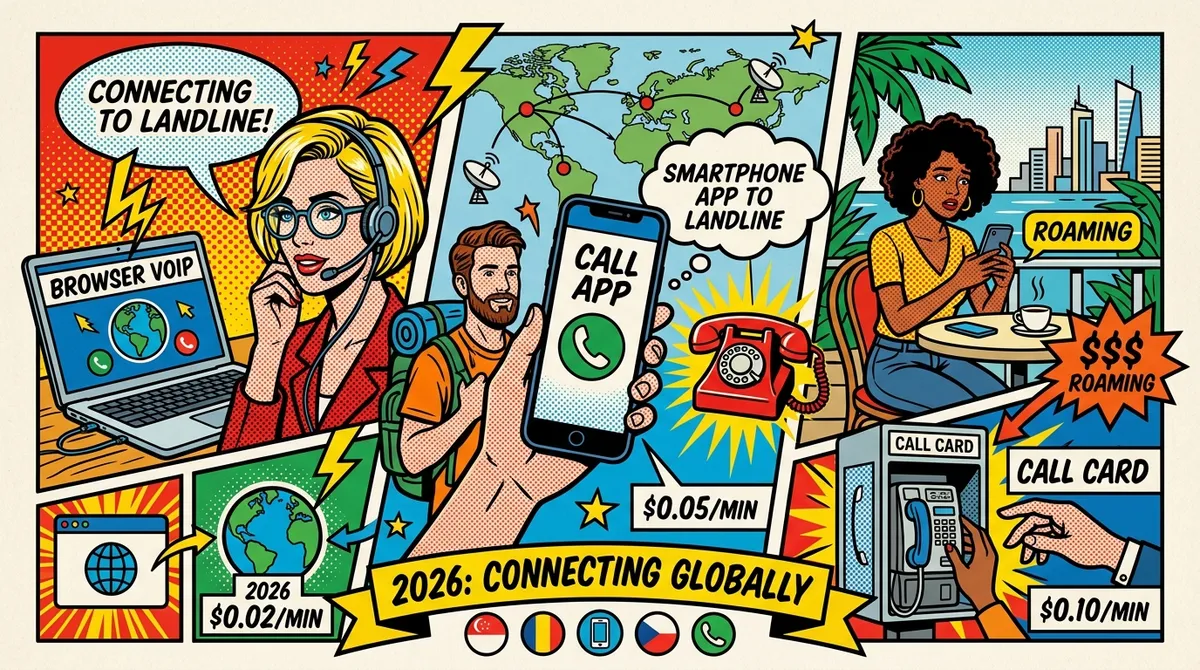
Your mom picks up the landline on the third ring. That’s how it used to work. You’d open Skype, dial her home number in Ohio, and talk for an hour at two cents a minute. Simple. Reliable. Done.
Except Skype is gone now. Microsoft shut it down, and millions of people who used it to call landlines internationally after Skype are left wondering what to do next. If you’re abroad — working from a cafe in Lisbon, an apartment in Chiang Mai, a coworking space in Medellin — and you need to reach a landline number somewhere in the world, this guide covers every option available in 2026.
No fluff. Real rates. Honest trade-offs.
Why Landlines Still Matter in 2026
It’s tempting to think landlines are dead. They’re not. Not even close.
Banks use them. Try calling Chase, HSBC, or State Bank of India. Those customer service lines are landline numbers. When your card gets frozen abroad and you need to sit on hold for 40 minutes, you’re calling a landline.
Government offices use them. The IRS, HMRC, the Indian passport office, the Social Security Administration — all landline numbers. You can’t WhatsApp a government bureaucracy.
Older family members use them. Your grandparents, your parents, your aunt who lives in a small town in Rajasthan or rural England. They have a phone on the wall, and they’d rather talk on it than figure out a video call app.
So the question isn’t whether you’ll need to call a landline internationally. You will. The question is how to do it now that Skype is gone.
The Four Ways to Call Landlines Internationally in 2026
Every method falls into one of four categories. Each has trade-offs.
1. Browser-Based VoIP Services
This is the closest replacement to what Skype offered. You open a website in your browser, buy credits, and dial a phone number. No app download required.
How it works: These services use your internet connection to route your voice to the regular phone network. Your browser handles the audio. The service connects you to an actual landline on the other end.
Best for: Digital nomads, expats, remote workers — anyone with reliable internet who needs to call real phone numbers regularly.
Examples: NomaPhone, DialAnyone, YadaPhone
The big advantage here is simplicity. You’re on your laptop already. You open a tab, dial a number, and you’re connected. No SIM card swaps, no app installations, no carrier plans.
NomaPhone charges $0.03/min to US/Canada landlines, $0.05/min to UK landlines, and $0.08/min to India landlines. Credits never expire, there are no connection fees, and no monthly minimums. A 30-minute call to a US bank costs $0.90.
DialAnyone is cheaper — $0.005/min to the US — but doesn’t offer call recording. YadaPhone sits in between at $0.02/min to the US and includes AI transcripts, though it doesn’t support SMS or 2FA verification.
All three work from any country with decent internet.
2. Calling Apps (Viber Out, Google Voice, etc.)
These are mobile or desktop apps that let you call phone numbers, not just other app users.
How it works: You install the app, buy credits or subscribe, and dial landline numbers through the app’s interface.
Best for: People who prefer mobile apps over browser tabs, or who already use the app for messaging.
Viber Out uses a credit-based system with rates that vary by country. It requires the Viber app installed on your phone. Coverage is strong in Eastern Europe and Central Asia, but rates can be higher than browser-based VoIP for common corridors like US and UK.
Google Voice is free for calls within the US and Canada — if you’re a US resident with a verified US phone number. That’s a big “if.” It works through a browser (web.google.com/voice) or the Google Voice app. For calling from Asia, users report lag and echo issues. It doesn’t work for international numbers outside the US/Canada calling plan.
The app-based approach has one significant downside: you need to install something. If you’re on a shared computer, a library terminal, or a device with limited storage, that’s a problem browser VoIP doesn’t have.
3. Carrier International Roaming
This is the “do nothing” approach. Keep your home carrier’s SIM card active and just dial the number while abroad.
How it works: Your carrier connects your call through international roaming agreements. You pay per-minute roaming rates or buy a daily/monthly international add-on.
Best for: Short trips where convenience matters more than cost. Not viable for long-term nomads.
Here’s the reality check on roaming costs:
- AT&T: $2.00-$3.00/min for international calls, or $10/day for their International Day Pass
- T-Mobile Magenta: $0.25/min in 200+ countries, or $15/month for an international calling add-on
- Verizon: $2.99/min, or TravelPass at $10/day
- EE (UK): Typically GBP 1-2/min
- Vodafone (UK): Typically GBP 1-3/min
A 30-minute call to a US landline on AT&T roaming costs $60-$90. The same call on a browser-based service costs under a dollar. That’s not a typo.
T-Mobile is the exception. Their Magenta plan includes $0.25/min international calling, which is workable for short calls. But if you’re sitting on hold with your bank for 45 minutes, that’s still $11.25 — compared to $1.35 on NomaPhone.
4. International Calling Cards (Prepaid)
The oldest method on this list. Buy a card (physical or digital), dial an access number, enter your PIN, then dial the actual number.
How it works: You prepay for minutes. When you want to make a call, you dial a local or toll-free access number, punch in your card code, then dial the international number. The calling card company routes the call.
Best for: Situations where you have no internet access and no roaming. A backup option, not a primary one.
Calling cards still exist in 2026, mostly as digital versions you buy online. Rates look attractive on paper — sometimes $0.01-$0.03/min — but the fine print often includes connection fees ($0.50-$1.00 per call), maintenance fees (weekly or monthly deductions from your balance), and rounded-up billing (a 2-minute call gets billed as 5 minutes).
The experience is also clunky. Dialing an access number, entering a PIN, then entering the full international number takes 30-45 seconds before you hear a ring. If the call drops, you start over.
Calling cards made sense in 2005. In 2026, they’re a last resort.
Cost Comparison: Calling Landlines in the US, UK, and India
Here’s what a 30-minute call to a landline actually costs with each method, using real 2026 rates.
Calling a US Landline (30 minutes)
| Method | Cost | Notes |
|---|---|---|
| AT&T roaming | $60.00 - $90.00 | $2-3/min roaming rate |
| Verizon roaming | $89.70 | $2.99/min standard rate |
| T-Mobile Magenta | $7.50 | $0.25/min included rate |
| Calling card (typical) | $1.50 - $3.00 | Hidden fees may apply |
| YadaPhone | $0.60 | No SMS/2FA support |
| NomaPhone | $0.90 | Browser-based, no app needed |
| DialAnyone | $0.15 | Cheapest browser option |
| Google Voice | Free | US residents only, quality varies |
Calling a UK Landline (30 minutes)
| Method | Cost | Notes |
|---|---|---|
| AT&T roaming | $60.00 - $90.00 | Standard roaming rates |
| Vodafone roaming | $45.00+ | Varies by plan and location |
| NomaPhone | $1.50 | $0.05/min to UK landlines |
| Viber Out | $2.00 - $4.00 | Rates vary, check current pricing |
| Calling card | $2.00 - $5.00 | Connection fees usually apply |
Calling an India Landline (30 minutes)
| Method | Cost | Notes |
|---|---|---|
| Carrier roaming (US) | $60.00 - $90.00 | Standard international rates |
| NomaPhone | $2.40 | $0.08/min to India landlines |
| Calling card | $1.50 - $4.00 | Quality often poor on India routes |
| Viber Out | $3.00 - $6.00 | Rates vary by state |
The pattern is clear. Browser-based VoIP services cost a fraction of what carrier roaming charges. The only free option — Google Voice — only works for US residents calling US/Canada numbers.
How to Choose the Right Method
There’s no single best answer. It depends on your situation.
You need to call a US bank from abroad
Use browser-based VoIP. You’ll be on hold for a long time, and every minute on carrier roaming is money burning. At $0.03/min with NomaPhone, a 45-minute hold costs $1.35. On AT&T roaming, that same hold costs $90-$135.
If you’re a US resident with Google Voice set up, that works too — but test the quality from your current location first. Lag and echo from Southeast Asia are common complaints.
You need to call a parent’s landline regularly
Set up a browser VoIP account with credits. A weekly 30-minute call to a US landline costs about $3.60/month on NomaPhone. That’s less than a single cup of coffee in most airports.
You need to call a UK government office
Browser VoIP at $0.05/min is the practical choice. Government hold times are unpredictable. HMRC alone has average wait times over 20 minutes. You want the cheapest per-minute rate you can get for an unknown call duration.
You’re on a short trip and only need one call
If you already have T-Mobile Magenta, just use your roaming. At $0.25/min, a quick 5-minute call costs $1.25. Not worth setting up a new account for that.
If you’re on AT&T or Verizon, the math changes fast. Even one 10-minute call at $2.50/min costs $25. Opening a browser VoIP account takes 30 seconds and saves you $24.
You have no internet access
Calling cards or carrier roaming are your only options. This is rare in 2026 — most places digital nomads go have WiFi or mobile data — but if you’re genuinely offline, a prepaid calling card works.
Tips for Better Landline Calls from Abroad
A few practical things that make international landline calls go smoother.
Get the number format right
International calling requires the full number with country code. For US numbers, that’s +1 followed by the area code and number. UK landlines start with +44. India is +91. Most browser VoIP services handle formatting automatically, but if you’re copying a number from a website, make sure it includes the country code.
Time zones matter more than you think
Calling a US government office from Southeast Asia means dialing at midnight or early morning your time. Calling a UK bank from the Americas means catching their afternoon. Before you set up your call, check the business hours in the destination country and do the timezone math.
Test your internet before important calls
Browser-based calling needs a stable connection. You don’t need blazing speed — 1 Mbps up and down is plenty — but you need consistency. A cafe with 50 Mbps that drops every 30 seconds is worse than a hotel with 5 Mbps that stays connected.
If the call matters (bank, lawyer, government), find a quiet spot with reliable WiFi. A hotel room beats a busy coworking space. A private Airbnb beats a cafe.
Have a backup plan
If your browser call drops mid-conversation with your bank, you don’t want to start the authentication process over. Keep your carrier roaming active as a fallback — you don’t have to use it, but knowing you can is worth the peace of mind.
What About WhatsApp and FaceTime?
Good question. WhatsApp calls and FaceTime are free and work great — when both sides have the app. The problem with landlines is that they don’t run WhatsApp. Your mom’s wall phone in Ohio, the Chase fraud department, the IRS — none of them have WhatsApp installed.
App-to-app calling solves a different problem. It’s perfect for calling your friend in Berlin who also has an iPhone. It’s useless for calling a landline number.
That’s exactly the gap Skype used to fill, and it’s exactly the gap browser-based VoIP fills now.
Frequently Asked Questions
Can I call any landline in the world with browser VoIP?
Most browser VoIP services cover 150-210+ countries. The major corridors — US, UK, Canada, India, Australia, Germany, Mexico — are available on every service. Obscure destinations may have limited coverage or higher rates. Check your provider’s rate page before calling.
Do I need a special headset or microphone?
No. Your laptop’s built-in microphone and speakers work fine. If you want better audio — especially for long calls — any basic earbuds with a microphone will improve things. You don’t need a fancy headset.
Will the person I’m calling see my number?
It depends on the service. Some VoIP providers show a generic number or “Unknown Caller.” Others let you display a virtual number you’ve purchased. If caller ID matters (for example, so your mom recognizes your call), check whether your service supports number display.
Is call quality good enough for important calls?
Browser-based VoIP quality in 2026 is significantly better than it was five years ago. On a stable internet connection, most people can’t tell the difference between a VoIP call and a regular phone call. The weak link is always your internet connection, not the service itself.
Are there any free options for calling international landlines?
Google Voice is free for US/Canada calls but restricted to US residents. Beyond that, truly free landline calling doesn’t exist — someone has to pay the termination fees to connect to the phone network. The most affordable options are browser VoIP services starting at half a cent per minute.
The Bottom Line
Skype is gone, but calling landlines internationally is still straightforward. Browser-based VoIP services have picked up exactly where Skype left off — pay-as-you-go credits, per-minute rates, calls to real phone numbers in 200+ countries.
The rates are comparable to or better than what Skype used to charge. The experience is similar: open your browser, dial a number, talk. No apps, no contracts, no subscriptions required.
If you’re a digital nomad, expat, or remote worker who needs to reach landlines back home — banks, family, government offices — set up one of these services before you need it. The worst time to figure out international calling is when your bank card is frozen and you’re standing outside an ATM in Bangkok.
NomaPhone is a browser-based international calling service built for digital nomads and expats. Call landlines and mobiles in 210+ countries at rates starting from $0.03/min. No app download. No subscription. Credits never expire. Try NomaPhone and make your first call in 30 seconds.